Free Budget App - Track Expenses, No Subscription Ever
Simple, powerful tools to manage money with ease.
Start free. Upgrade once if you ever need more. No subscriptions, ever.

Key Features
Simple, powerful tools to master your money without monthly fees.
Quick Transaction Entry
Add a new transaction with just one tap. Simply enter the amount, and you're done.
Clear Expense Insights
Input your daily spending, and WhizBudget will create a helpful chart to show exactly where your money is going
Easy Budget Planning
Plan your income and expenses with ease. Use your average monthly spending calculated automatically based on your previous months.
Monitor Debts and Savings
Stay on top of your account balances and move closer to your financial goals
Multi-Currency Support
Keep your finances accurate with automatically updated exchange rates
Seamless Synchronization
Access your financial data on all your devices
Perfect for Couples & Joint Accounts
Share budgets and manage finances together - WhizBudget makes it simple for couples or families to collaborate and track goals as a team.
Sinking Funds Made Simple
Effortlessly organize and grow your sinking funds for future expenses. Allocate money for holidays, repairs, or big purchases and track your progress automatically.
Set and Track Financial Goals
Define personalized savings or debt repayment goals. Watch your achievements stack up as WhizBudget helps you stay on target and motivated.
Track Your Net Worth Over Time
See how your assets and debts add up in one clear trend line, so you can watch real progress build month after month.
Export Your Data Anytime
Your financial data belongs to you. Download your full transaction history as a CSV whenever you want, no lock-in.
Pricing FREE FOREVER
WhizBudget is free to start - no credit card, no trial clock. Track unlimited transactions, plan budgets, and manage up to 2 accounts at no cost. Need more? Upgrade once for a lifetime license and unlock unlimited accounts, categories, full history, and direct support. No monthly fees, no recurring charges, no subscriptions - ever.
Premium Access
Some features require an active WhizBudget account. Access availability is determined by your account status.
You can manage your account outside the app.
Frequently Asked Questions
Got questions about using WhizBudget? Here are some quick answers.
Expert Tips and Advice

The 30-Day Money Detox: Save Without Spending
A 30-day money detox is a short, structured break from non-essential spending. It isn't about suffering for a month; it's about interrupting autopilot spending, finding out what you genuinely miss, and freeing up cash for a goal. Done well, it changes your habits long after the 30 days end.
Set the Rules Before You Start
Write down three lists so there are no grey areas mid-month:
- Essentials (allowed): rent, bills, groceries from your list, transport, medicine, debt payments.
- Not allowed: takeaways, eating out, clothes, gadgets, impulse online orders, new subscriptions.
- Exceptions: anything already committed, like a birthday gift or a booked trip, with a fixed amount.
Also decide where the saved money goes: an emergency fund, a debt, or a specific goal. A named destination makes the detox much easier to stick with.
Week 1: Audit and Clear Out
- Review the last 30 days of bank and card statements and note every non-essential purchase.
- Cancel or pause subscriptions you don't use; our subscription audit takes about 30 minutes.
- Delete saved card details from shopping apps and unsubscribe from sale emails.
Week 2: Use What You Have
- Plan meals around what's already in your cupboards and freezer.
- Find free entertainment: library, parks, free events, games nights at home.
- Keep a "want list" instead of buying; review it at the end of the month.
Week 3: Handle the Cravings
Week three is usually the hardest. When you want to buy something, wait 48 hours and write down what triggered it: boredom, stress, an advert, a friend. Patterns show up quickly. If online shopping is your weak spot, our 7-day plan to stop impulse buying has more tactics.
Week 4: Review and Decide What Stays
- Add up what you saved compared with your usual month.
- Go through your want list. Most items will no longer feel necessary.
- Choose two or three habits to keep, such as fewer takeaways or no saved cards.
Make the Savings Last
The biggest risk is a spending rebound in month two. Prevent it by moving the money you saved to its goal on day 30, then setting monthly limits for the categories you cut. Small savings habits like these micro-saving hacks help the change stick.
Track the Detox
Record every purchase during the month, even essentials. Seeing your daily spending flatten is motivating, and the record shows exactly where your money normally goes. A six-month spending review afterwards shows whether the new habits held.
Frequently Asked Questions
How much can I save with a 30-day money detox?
It depends on how much of your usual spending is non-essential. Your Week 1 audit gives you a realistic estimate before you start.
What if I slip up?
Note what happened and carry on. One purchase doesn't end the detox; the goal is awareness, not perfection.


Understand Your Income and Expenses
Before creating a budget, it's important to have a clear picture of how much money is coming in and where it's going. Understanding your income and expenses helps you spot areas where you can make adjustments to reach your financial goals.
Start by tracking your income, which includes any money you earn regularly. This could be your salary after taxes, income from freelance work or side gigs, rental earnings, government benefits, or investment returns. Having a complete breakdown of your income sources gives you a better idea of what you're working with each month.
Next, take a close look at your expenses. These generally fall into two categories:
- Fixed expenses, like rent, insurance, and loan payments, which stay the same each month.
- Variable expenses, such as groceries, dining out, entertainment, and shopping, which can fluctuate.
Going through your bank statements or using budgeting apps can help you categorize and track your spending more accurately. Once you have a list, compare your total income to your total expenses. Are you consistently spending more than you earn? If so, it may be time to cut back in certain areas, like subscriptions or impulse purchases.
If you’re looking for an easy way to keep track of everything, there are plenty of tools available. While many paid apps offer useful features, WhizBudget stands out for its free tools and cross-device accessibility. If you prefer a more hands-on approach, spreadsheets like Google Sheets or Excel can work too, though they may not be as tidy or automated as an app.
Once you have a solid understanding of your income and expenses, you can make better financial decisions and create a budget that works for you. The key is consistency, regularly reviewing your finances will help you stay in control and work toward your goals.
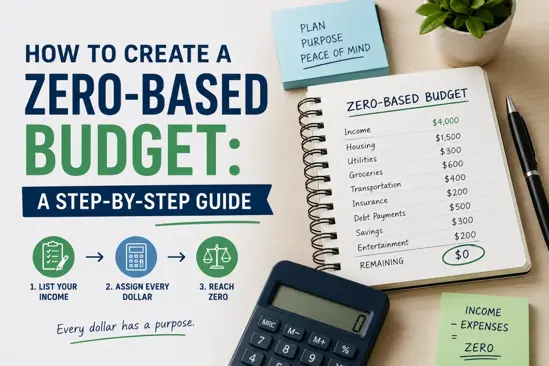
How to Create a Zero-Based Budget: A Step-by-Step Guide
A zero-based budget is a budgeting method where every dollar of your income is allocated to specific expenses, savings, or debt repayment, leaving you with zero unallocated funds. This approach encourages conscious spending and ensures that every dollar you earn is put to work in your personal finance strategy.
Benefits of a Zero-Based Budget
Implementing a zero-based budget offers several advantages:
- Increased Awareness: You gain a clear understanding of your financial situation.
- Improved Control: You control where your money goes, reducing unnecessary expenses.
- Financial Goals: It helps prioritize saving for financial goals and emergencies.
- Adaptability: Your budget can be adjusted to reflect changes in income or expenses.
Step 1: List Your Income
The first step in creating a zero-based budget is to list all your sources of income. This includes your salary, side hustles, and any other earnings. Make sure to calculate your total monthly income.
Step 2: Identify Your Expenses
Next, you need to identify all your monthly expenses. This can be divided into fixed and variable expenses:
- Fixed Expenses: Rent, mortgage, insurance, etc.
- Variable Expenses: Groceries, entertainment, dining out, etc.
Step 3: Allocate Every Dollar
Once you have your income and expenses listed, allocate every dollar from your income to your expenses, savings, or debt repayment. This is the essence of a zero-based budget. Your income minus your expenses should equal zero.
Step 4: Review and Adjust Monthly
Budgeting is not a one-time task. Review your zero-based budget at the end of each month. Adjust your allocations as necessary to reflect changes in income or expenses.
Common Mistakes to Avoid
When creating a zero-based budget, be mindful of common pitfalls:
- Underestimating Expenses: Always overestimate your variable expenses to avoid surprises.
- Not Adjusting Regularly: Make it a habit to adjust your budget every month.
- Ignoring Irregular Expenses: Don’t forget to account for annual or semi-annual expenses.
FAQs
What is a zero-based budget?
A zero-based budget is a method where every dollar of your income is assigned to expenses or savings, leading to a balance of zero.
How do I start a zero-based budget?
Start by listing your income, identifying your expenses, and allocating every dollar until your income minus expenses equals zero.
Can I use budgeting tools?
Yes, tools like WhizBudget can simplify the process and help you track your budget effectively.
How often should I review my budget?
Review your budget monthly to make necessary adjustments based on your financial situation.
What if my expenses exceed my income?
If your expenses exceed your income, consider cutting non-essential expenses or finding ways to increase your income.
Is zero-based budgeting suitable for everyone?
While it can be beneficial, it may not be suitable for everyone. Assess your personal finance strategy and comfort with detailed budgeting.
Conclusion
Creating a zero-based budget can significantly improve your financial management and help you achieve your financial goals. By following these steps, you can take control of your finances and ensure every dollar is working for you. For those looking for a helpful budgeting tool, consider using WhizBudget to make the process easier and more efficient.
What Is a Budget App and Why You Need One (Without Monthly Fees)
In today's fast-paced financial world, keeping track of where your money goes isn't just helpful - it's essential. Rising living costs, unexpected expenses, and increasingly digital lifestyles can make personal finance feel overwhelming.
That's where a budget app comes in.
A budgeting app helps you understand your spending habits, manage expenses, and make smarter money decisions - all from your phone or computer. As a solo developer, I built WhizBudget to be a genuinely free, simple personal finance app without unnecessary complexity or hidden costs.
Let's break down what budget apps are, why they matter, and why choosing the right one can make all the difference.
What Exactly Is a Budget App?
A budget app is a digital money management tool that helps you plan, track, and organize your finances. Think of it as a personal finance assistant that gives you clarity and control over your income and spending.
Most budget and expense tracking apps include features such as:
- Expense tracking (manually or automatically)
- Categorizing your income and spending
- Goal setting for savings or debt payoff
- Visual reports to help you see patterns over time
- Reminders or alerts to keep your finances on track
The best part? You don't need to be a finance expert to use one. Budget apps simplify the process, replacing clunky spreadsheets or notebooks with user-friendly interfaces and automation.
WhizBudget is designed for real people - singles, couples, and families - offering essential budgeting tools in a clean, simple interface, while keeping advanced features available for users who want deeper insights.
Why Is Having a Budget App Important?
Managing your money shouldn't feel like guesswork. While using a budgeting app won't magically make you rich, it can significantly improve your financial awareness and decision-making. Here's how using a budget app can create a real impact on your financial well-being:
- Clear Financial Visibility - Budget apps give you a real-time view of where your money is going. No more surprises at the end of the month.
- Smarter Decision-Making - When you can see your spending trends, you're more likely to make informed - and often better - financial choices.
- Saves Time and Reduces Errors - Whether it's paying down debt, building an emergency fund, or saving for a vacation, budgeting apps help you set, track, and reach those goals.
- Financial Peace of Mind - With better visibility and control, you'll reduce stress and feel more confident managing your money day to day.
- No Surprise Fees
Here's something that sets WhizBudget apart:
While most apps require ongoing monthly or yearly subscriptions, WhizBudget is a one-time purchase. That means you get full access to all features - forever - without worrying about recurring payments eating into your savings.
It's budgeting on your terms - simple, honest, and cost-effective.
Take Control Without the Commitment
A budget app isn't just another download - it's a tool to help you build a healthier, more intentional financial future. And with so many options available, choosing the right one matters.
WhizBudget was built for people who want clarity, control, and convenience - without the hassle of subscriptions. Start for free, and if you outgrow it, pay once and it's yours. No hidden charges. No subscription, ever.
Start budgeting with confidence.
Try WhizBudget today - and take control of your money, your way.
Pricing and access options are explained on our website. Availability may vary by platform.